Search
Close this search box.

Guide to the New CUPE Jobs Site

As you may have heard, there has been an update to the CUPE Jobs website. We are aware of the various functional problems with the website and have been actively addressing those with the employer.

In the meantime, we have created this step-by-step guide for Unit 2 specific applications! We are planning to create similar guides for blanket applications for Units 1 and 2 once blanket application season begins.


  • Go to cupejobs.uit.yorku.ca. It will take you to the dashboard.
  • Click on the circle at the top right and click ‘sign in’
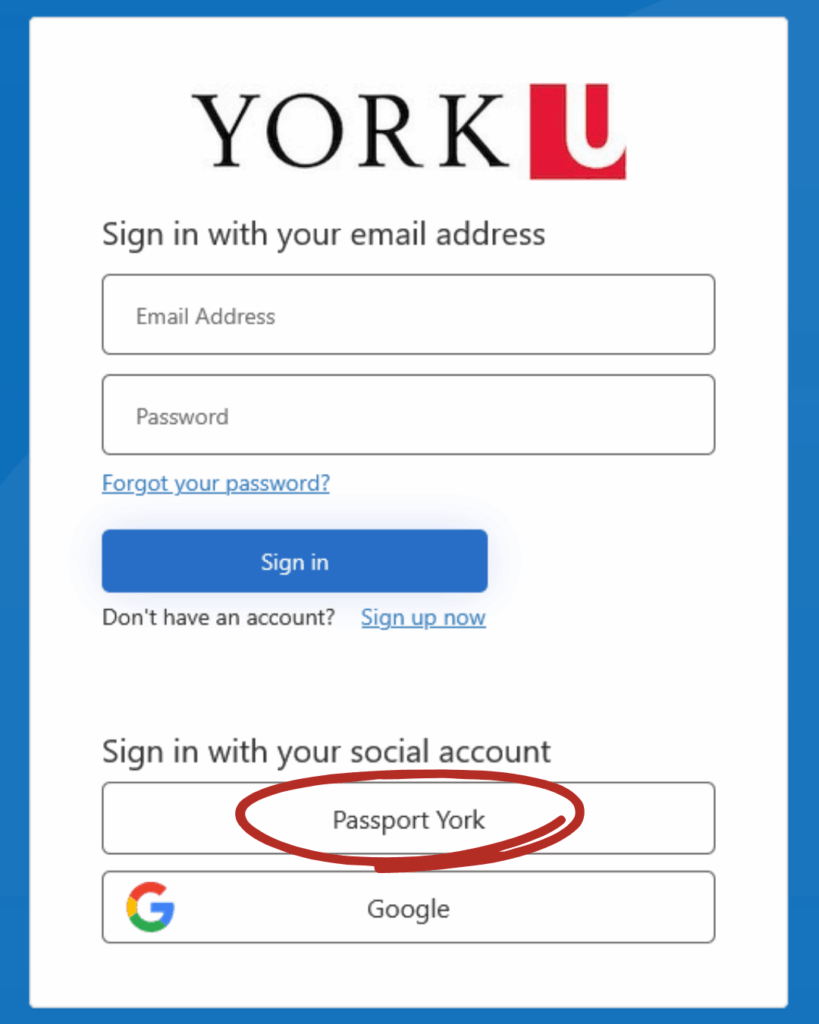
  • If you have an existing Passport York account, you must click ‘Passport York’ under ‘Sign in with socials’. Do NOT sign in using your email address.

A screenshot showing that clicking on the red person icon on the top right of the screen gives the option to sign in.
Different log in options, with a red circle around the Passport York option, which is under text that says: sign in with your social account.

Unit 2 Specific Applications

  • Click on ‘Postings’, scroll down to your faculty, click ‘CUPE2’, then select the semester.
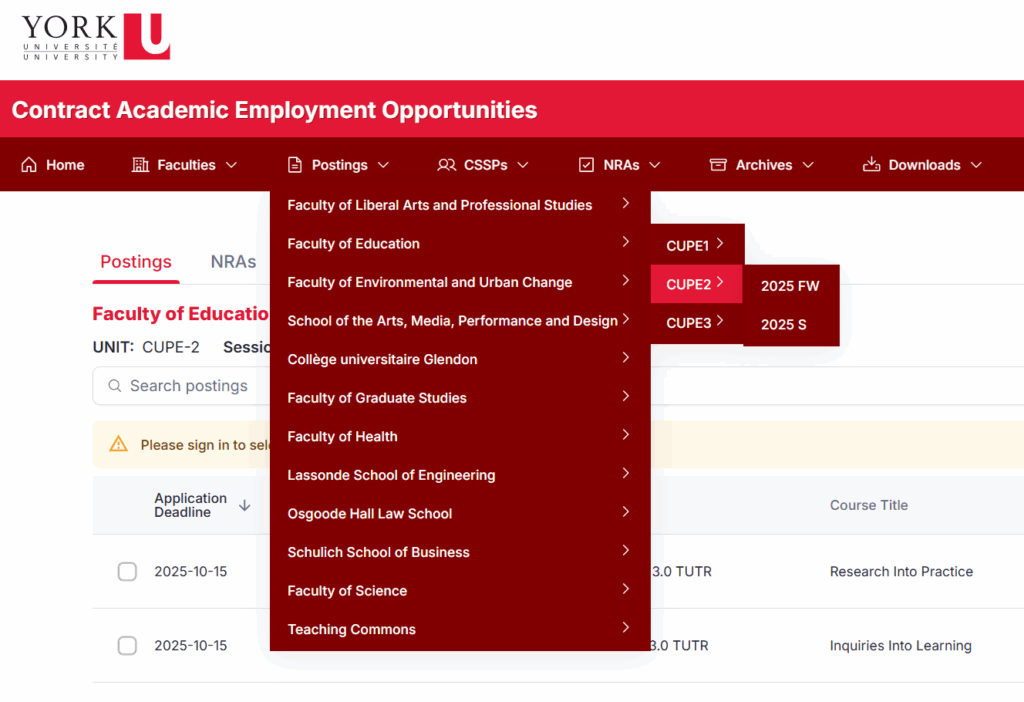
Screenshot of the CUPE jobs site showing that clicking on 'postings' in the menu will open a lit of faculties, which each tab to a list of units, which then tabs to the term to which you want to apply.
  • All the postings for the selected term in the selected faculty will appear. Check the box next to a posting to add it to your cart. The box will not be selectable if the posting deadline has passed.
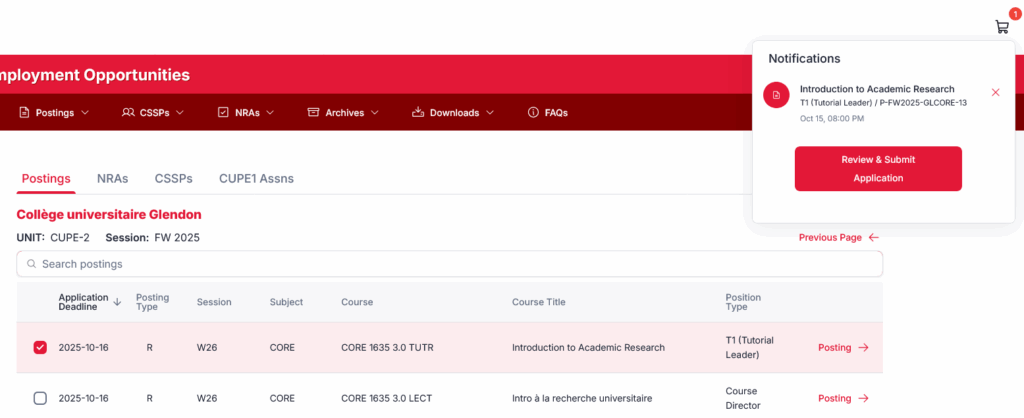
Screenshot that shows that if you click on a checkbox next to a posting, it will add it to your job basket and you will get a notification.
  • Once you’ve added all the courses to which you want to apply to your cart, click ‘Review & Submit Application’. This will take you to your ‘Job Basket’. Click ‘Submit Specific Applications’.
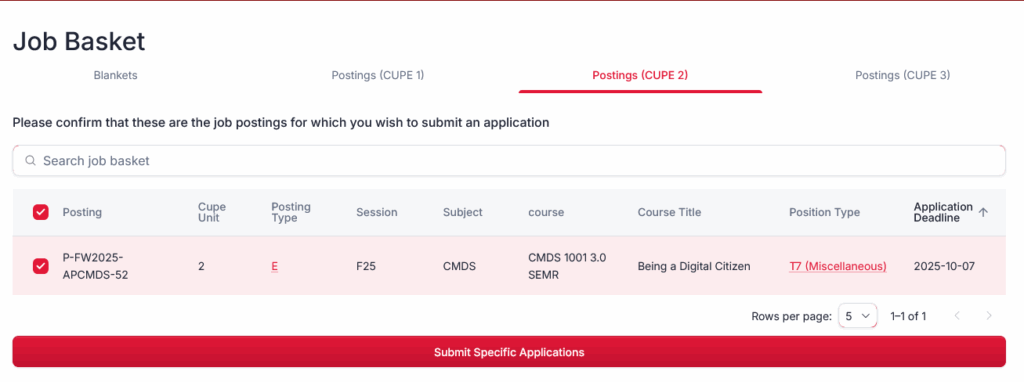
A screenshot of the job basket showing the selected courses and the 'submit specific applications' button.
  • Follow all the steps to the application. Currently, only specific applications are accepted as the blanket application period has not yet opened (except for members in the Continuing Sessional Standing Program (CSSP)). Update: The phone number in the screenshot has been removed after union feedback, since it is no longer operational.
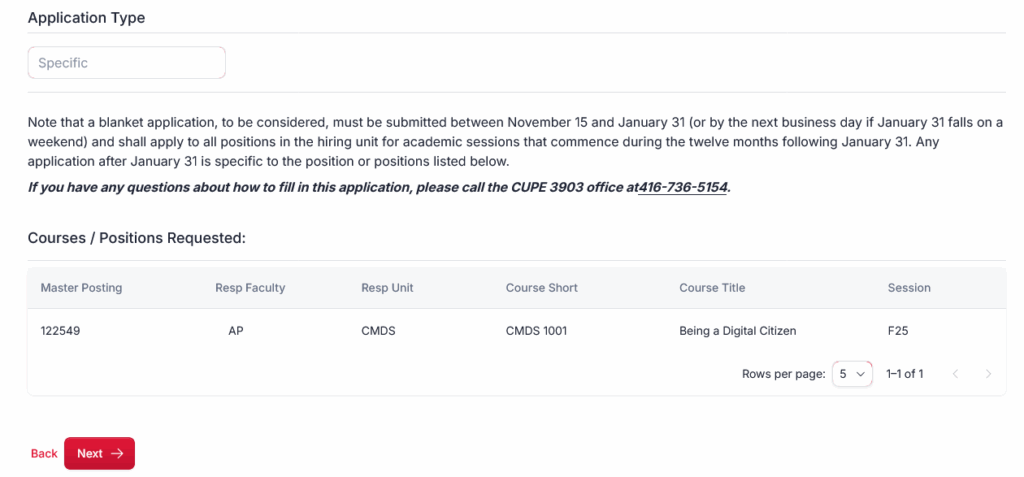
A screenshot of the CUPE jobs site showing a window that says application type and gives information about different types of applications. It also lists the courses requested, and there is a 'next' button.
  • The system will automatically include your work history. You can view your assignments for the last year. You do not need to do anything on this page. Click ‘Next’.
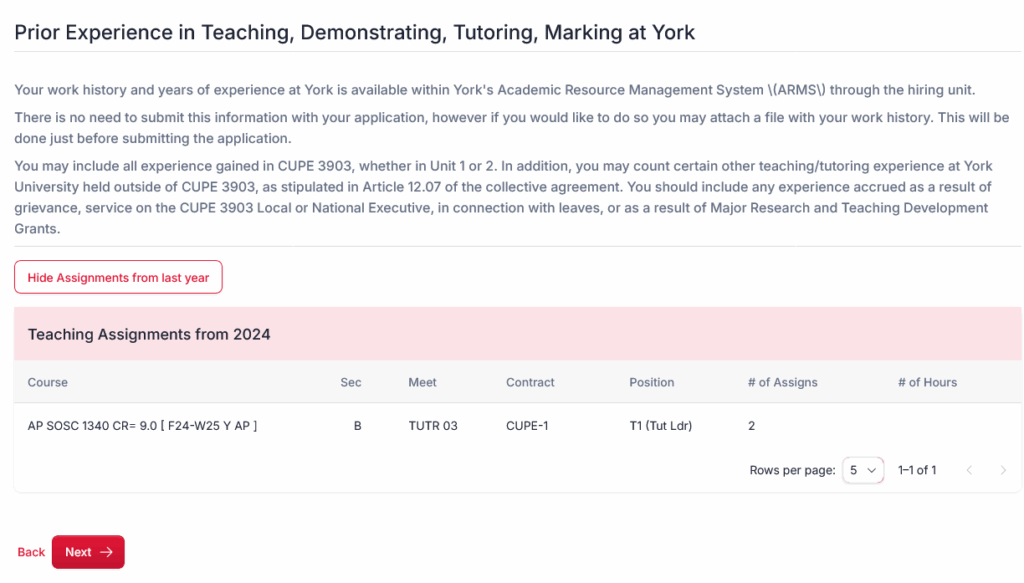
A screenshot from the CUPE jobs site showing that the system will log your assignments from the last year.
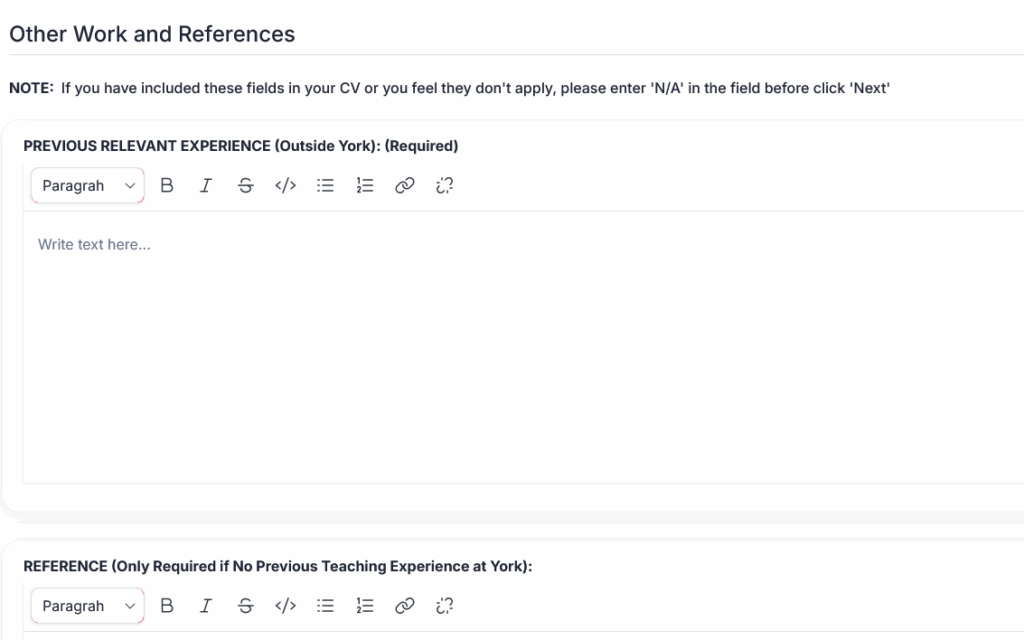
  • Fill in the requested information at step 4. If the information already exists in the CV you are uploading with your application, you are not required to fill out this part. Put ‘N/A’ as the field is required.
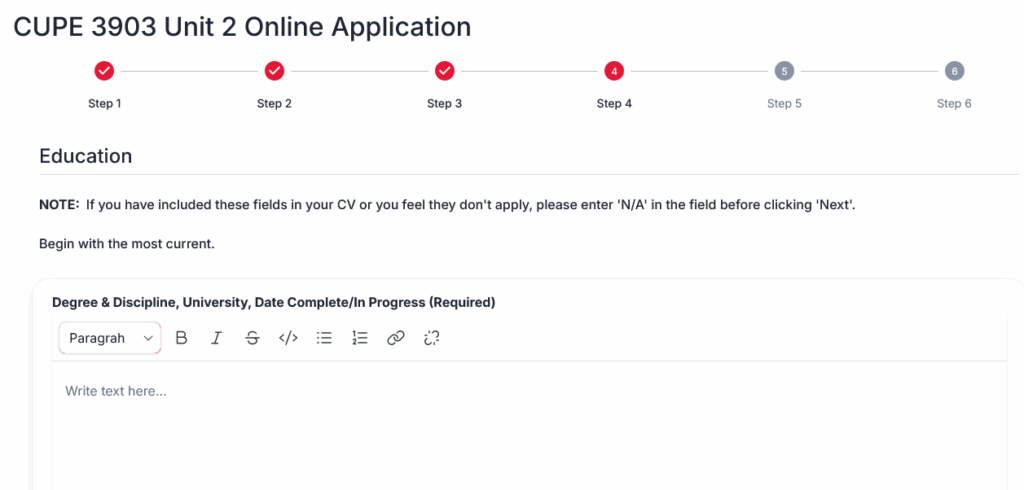
A screenshot from the CUPE jobs site showing step 4, where you can enter your education information.
A screenshot from the CUPE jobs site showing that you can enter other work and references to your application if you choose to.
  • When you click ‘Next’ to Step 6, it will bring you directly to the Self-ID survey. You will need to scroll up to see ‘Review and Submit’, where you can attach a Work History and CV.
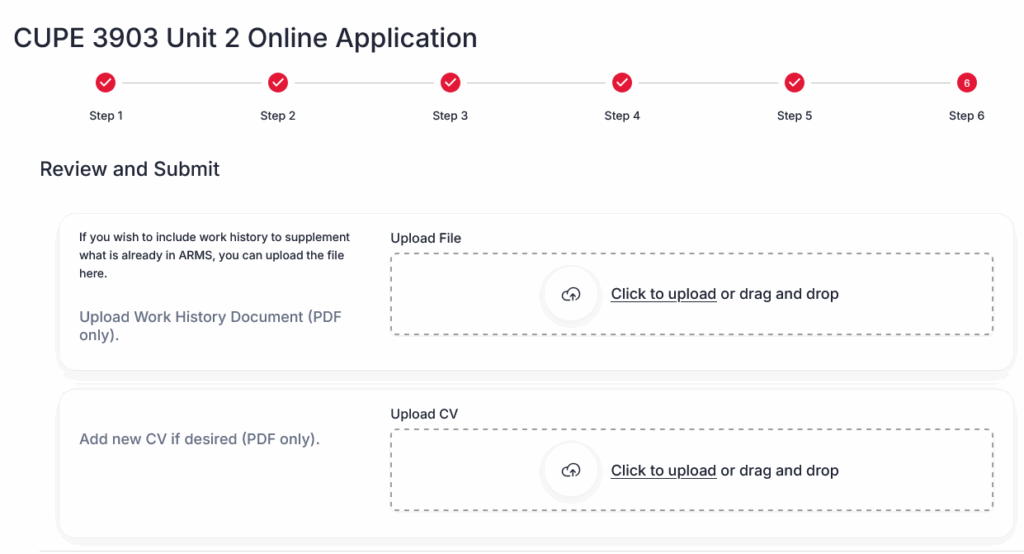
A screenshot from the CUPE jobs site showing the 'review and submit' window which you will see if you scroll up, where you can upload your work history and updated CV is you so choose.
  • We encourage you to fill out the Self-ID survey. This information helps the union and the employer get a better sense of the makeup of the membership and informs employment equity provisions and programs. However, it is completely voluntary.
  • Submit your application — you are done!

Congratulations to the newly acclaimed members of the Units 1, 2, & 3 Bargaining Team (BT)! The acclaimed BT members are Alex Painter (BT Unit...

CUPE 3903’s team on the joint Labour-Management Committee (Units 1–3) has recently renegotiated the terms of the Unit 1 Books/Supplies Fund. Formerly managed by Faculty...

Due to unforeseen circumstances, the adjudication of the Fall 2025 Professional Development Fund (PDF) applications (submitted by the deadline of January 10) will be delayed. The...

Bargaining will be heating up soon! CUPE 3903’s bargaining with York has several stages that are important to keep your eye on as a member:...

The Bargaining Team (BT) held a meeting on Friday, January 30, 2026, with current BT members, other members (including various executives), and CUPE 3903 staff in attendance. ...

What’s Bargaining Anyway? CUPE 3903 is a labour union that is powered by members like you. One of the most important ways that we, as...

The two webpages about Sun Life health benefits are now available in French, courtesy of the Communications Committee’s Bilingualism Representative! Cherchez-vous des renseignements au sujet...

Bargaining is just around the corner! If you think that your department or hiring unit would benefit from getting more engaged with the bargaining process,...

Attention all Unit 1 members: Did you get your Winter 2026 TA contract yet? Was it later than other years, or were there issues getting your...

Skip to content